Last night’s backup finished without a hitch. Then ransomware hits, and the copy you need is sitting in the same environment as the systems under attack. Suddenly, a successful backup job does not count for much.
That is the risk of keeping production systems and every backup copy in one on-premise environment. A hardware failure, configuration mistake, compromised account, or physical disaster can take down your primary data and your recovery plan at the same time.
That is why companies need enterprise data backup supported by a well-defined enterprise backup strategy that connects on-premise protection with cloud and hybrid cloud recovery. This approach ensures every copy is stored and protected appropriately, giving the business a reliable path to recovery when disruption occurs..
What Is Enterprise Data Backup?
Enterprise data backup is a coordinated approach to protecting business information across applications, systems, and storage environments. It combines scheduled backups, retention policies, access controls, storage decisions, and recovery testing to keep critical data available and recoverable during system failures, accidental deletion, or cyberattacks.
Keeping every copy on-premise increases exposure to physical disasters, hardware failures, and maintenance costs. An effective strategy also establishes a recovery point objective, or RPO, to define acceptable data loss and a recovery time objective, or RTO, to determine how quickly operations must resume.
Why Indonesian Enterprises Are Moving Backup to the Cloud
As business data spreads across applications and locations, adding more hardware can make protection increasingly expensive and difficult to manage. Cloud backup offers a more flexible way to expand capacity, separate recovery copies, and reduce dependence on a single data center.
Three priorities are driving that shift.
Strengthen Data Security and Regulatory Readiness
Indonesia’s Personal Data Protection Law requires organizations to protect the personal information they process. Banking regulation POJK 11/2022 also requires financial institutions to maintain disaster recovery plans. A cloud backup solution can support these requirements through encryption, access controls, activity logging, and appropriate retention policies.
Move from Upfront CAPEX to Flexible OPEX
Pay-as-you-grow models allow storage capacity to expand alongside business needs. Instead of committing to large hardware purchases upfront, organizations can shift part of their spending toward more predictable operating costs based on the capacity and services they use.
Keep Recovery Targets Measurable
Automated backup schedules, retention policies, and monitoring help organizations meet their RPO and RTO targets more consistently. Backup records and restore test results also provide useful documentation for internal reviews, IT audits, and ongoing improvements to recovery readiness.
Build Hybrid Cloud Recovery That Holds Up Against Ransomware
Ransomware can spread beyond production systems when backup copies share the same accounts or access paths. A resilient hybrid cloud backup architecture separates data across locations, storage media, and access controls so one attack cannot compromise every recovery copy.
Three layers make that protection more effective.
Put the 3-2-1 Backup Rule to Work
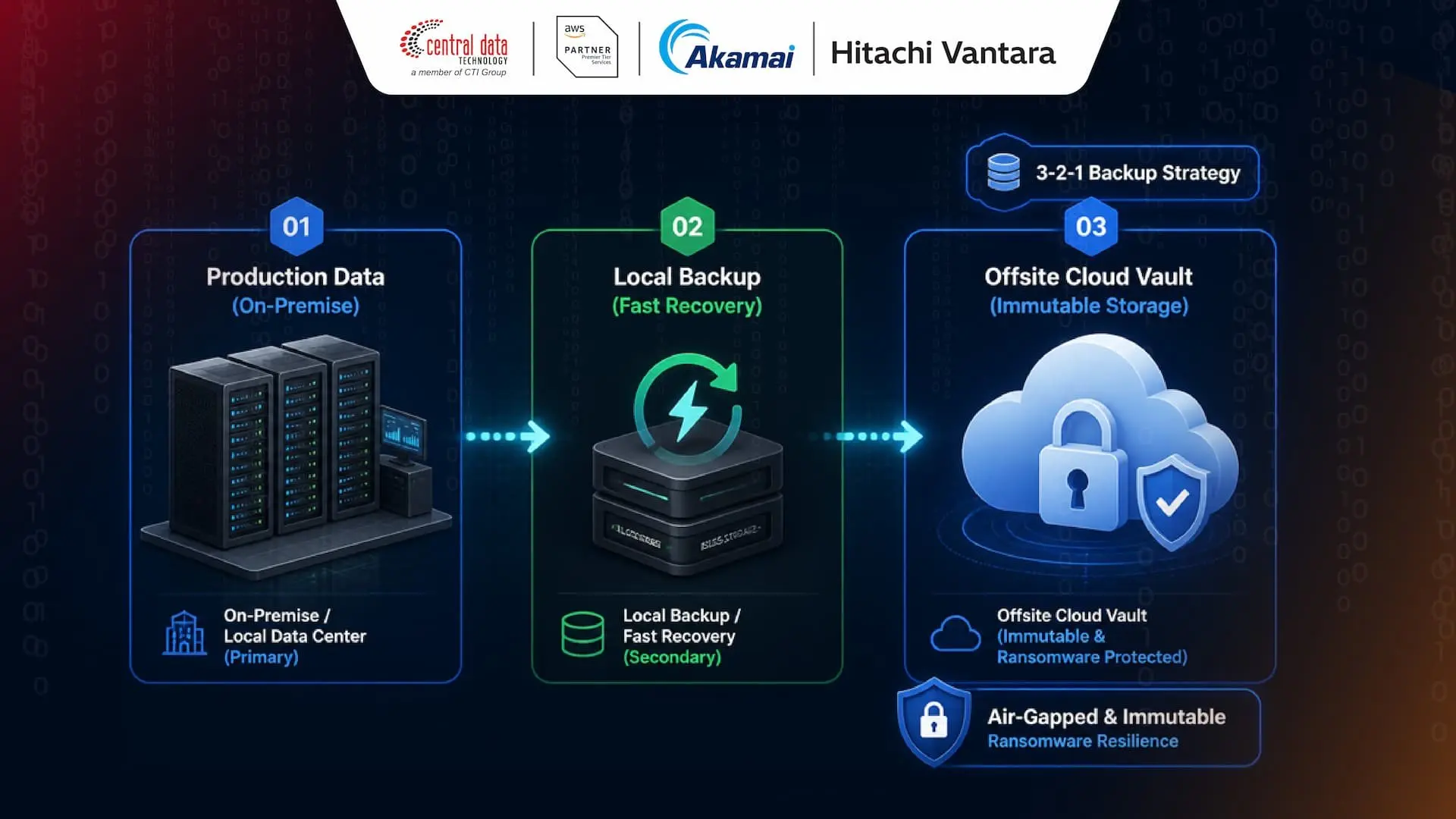
The 3-2-1 rule calls for three copies of critical data, stored across two types of media, with one copy kept off-site or in the cloud. This separation reduces the risk of losing everything to a single physical incident or cyberattack.
Isolate and Lock Down Backup Copies
Air-gapped storage separates backup access from production systems. Immutable storage adds another safeguard by preventing data from being modified or deleted during a defined retention period, even when attackers gain access to the primary environment.
Protect Data Integrity with Self-Healing Objects
Self-healing objects detect corruption and automatically repair affected data using healthy copies or fragments. This helps preserve data integrity over time and increases confidence that stored information will still be usable when recovery begins.
Three Enterprise Backup Solutions for Different Business Needs
Workloads vary in scale, location, and recovery requirements. Choosing the right enterprise backup solutions starts with understanding what each environment needs and where each platform fits.
Here is how AWS, Akamai, and Hitachi Vantara approach the challenge.
1. AWS Backup for Centralized Protection Across AWS
AWS Backup is a policy-based service that centralizes protection for Amazon EBS, RDS, DynamoDB, EFS, and other supported AWS services. IT teams can manage backup schedules, retention policies, eligible cold storage transitions, and audit reporting from a more unified environment.
Multi-account and multi-Region capabilities, AWS Backup Vault Lock, and logically air-gapped vaults make it a strong fit for organizations running primarily on AWS or supported hybrid infrastructure.
2. Akamai Linode Backup for Simple Instance Recovery
Akamai Cloud Backups can be enabled through Cloud Manager without installing an additional agent. The service creates full file-based snapshots for Linode instances, including daily, weekly, and biweekly backups, along with one manual snapshot.
Copies are stored on separate hardware within the same data center. That makes the service useful for straightforward local recovery and predictable costs, while an additional off-site copy remains essential for a broader recovery strategy.
3. Hitachi Content Platform for Object Storage at Scale
Hitachi Content Platform, or HCP, provides object storage and a backup target for unstructured data at exabyte scale. Its capabilities include 15 nines of durability, self-healing objects, and immutable protection against unauthorized changes or deletion.
Integration with Veeam, Commvault, and Veritas supports hybrid cloud data protection. Hitachi also reports potential TCO savings of up to 65 percent compared with public cloud alone, depending on workload characteristics and architecture.
Comparing AWS, Akamai, and Hitachi Vantara for Enterprise Backup
Evaluation Parameter | AWS Backup | Akamai Linode Backup | Hitachi HCP Object Storage |
|---|---|---|---|
Architecture Model | Policy-based cloud backup for supported AWS services and hybrid workloads. | Managed file-based local backup for Linode compute instances. | Software-defined object storage for on-premise and hybrid cloud environments. |
Core Value | Centralized automation and multi-account, multi-Region governance. | Simple activation with no additional agent and predictable costs. | Long-term TCO optimization and data management at exabyte scale. |
Protection Mechanism | Vault Lock, immutable backups, and logically air-gapped vaults. | Copies stored on separate dedicated hardware within the same data center. | 15 nines of durability, immutable storage, and self-healing objects. |
Best-Fit Use Case | AWS cloud-native workloads and multi-account, multi-Region architectures. | Linode compute instances that require simple, cost-efficient local recovery | Large-scale unstructured data, long-term archives, and hybrid cloud backup targets. |
Build a Stronger Enterprise Backup Strategy with CDT
Through AWS Backup, Akamai Linode Backup, and Hitachi Content Platform, Central Data Technology (CDT), part of CTI Group, helps enterprises build backup architectures around their business and recovery requirements.
As an authorized AWS, Akamai, and Hitachi Vantara partner in Indonesia, CDT supports every stage, from consultation and deployment to ongoing support, helping organizations move forward without costly trial and error.
Contact us to discuss the right backup and recovery strategy for your business.
Author: Danurdhara Suluh Prasasta
CTI Group Content Writer
----
Frequently Asked Questions About Enterprise Backup Strategy
What Is the 3-2-1 Backup Strategy and Why Does It Matter?
The 3-2-1 backup strategy maintains three copies of data across two types of media, with one copy stored off-site. This separation reduces the risk of losing every copy to hardware failure, ransomware, or a localized disaster. CDT can help adapt the strategy to your workloads and recovery requirements.
What Are the Best Practices for Enterprise Data Backup?
Enterprise backup best practices include classifying data, defining RPO and RTO targets, encrypting backups, controlling access, maintaining immutable copies, and testing restores regularly. Organizations should also monitor retention policies and backup job results. CDT can help align these controls with business priorities and audit requirements.
What Types of Backup Strategies Do Enterprises Commonly Use?
Common approaches include full, incremental, and differential backups, each offering different tradeoffs in storage consumption and recovery speed. Organizations can combine these methods with local, off-site, or cloud copies. CDT helps businesses choose the right mix based on data volume, recovery targets, operational risk, and budget.
Can CDT Cloud Backup Solutions Support Indonesia’s PDP Law?
Yes. Cloud backup solutions can support compliance with Indonesia’s Personal Data Protection Law when encryption, data location, access controls, retention, and audit processes are configured appropriately. Compliance still depends on organizational governance and implementation. CDT can help design a backup environment aligned with applicable privacy and regulatory requirements.